
Download Web Page Maker – create web pages, web page design, drag and drop, no coding, professional website
Overview
Web Page Maker is a productivity-focused tool designed to simplify the creation of professional web pages for users with little to no technical background. The app enables individuals and small organizations to build and publish websites quickly, eliminating the need for coding knowledge. Its core purpose is to democratize web design by providing an accessible platform for anyone to establish an online presence without requiring expertise in HTML or web development.
Target users include freelancers, small business owners, students, and hobbyists who need a straightforward way to showcase their work, services, or projects online. By offering a streamlined workflow from design to publication, Web Page Maker addresses the common challenges of time, complexity, and technical barriers associated with traditional web development. The app is particularly valuable in an era where digital visibility is essential for personal and professional success.
Developed by Web Page Maker, the application is positioned as a utility for individuals seeking fast, reliable website creation. Although specific details about the developer’s background were not provided, the app’s focus on usability and accessibility suggests a user-centric design philosophy. Real-world use cases include creating personal portfolios, event websites, small business landing pages, and educational project sites.
Within the broader app ecosystem, Web Page Maker fills a niche for lightweight, no-code tools that prioritize speed and simplicity. It stands out among similar tools by emphasizing ease of use and immediate publishability, making it a practical choice for users who value efficiency and minimal learning curves.
Key Features & Functionality
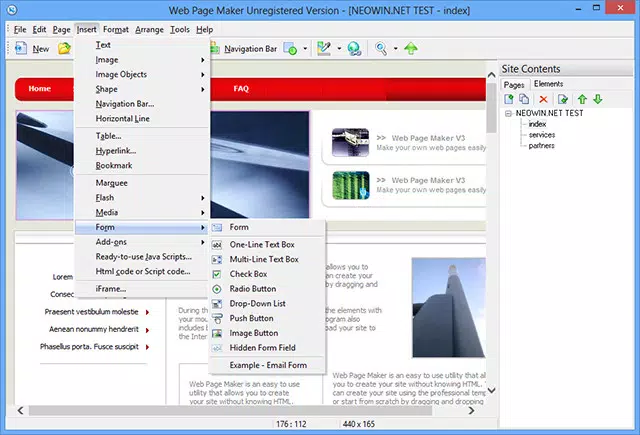
- Drag-and-Drop Interface: Users can effortlessly place text, images, buttons, navigation bars, and other visual elements directly onto the canvas. This intuitive method allows for real-time layout adjustments, giving full control over the visual hierarchy and spatial arrangement of content.
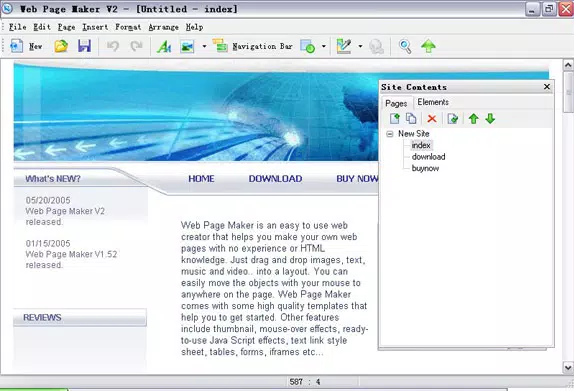
- Pre-Designed Templates: A selection of professionally crafted templates serves as a starting point for new projects. These templates are optimized for common use cases such as portfolios, business listings, and event announcements, reducing setup time and ensuring visually appealing results.
- No HTML Knowledge Required: The app abstracts all underlying code, allowing users to focus solely on design and content. This feature makes it ideal for beginners or non-technical users who want to create functional websites without learning programming languages.
- Customizable Elements: Users can personalize fonts, colors, backgrounds, and spacing to match their branding or aesthetic preferences. This level of control ensures that each website reflects the user’s unique identity.
- Quick and Easy Publishing: Once the design is complete, users can publish their web pages directly to the internet with minimal steps. This seamless integration between design and deployment reduces friction in the website creation process.
For example, a student creating a project showcase can use a template, add their work samples with drag-and-drop, adjust colors to match their school’s theme, and publish the site in under 15 minutes. Similarly, a local artist can build a simple gallery site by placing images and adding captions without writing a single line of code.
Interface, UX & Performance
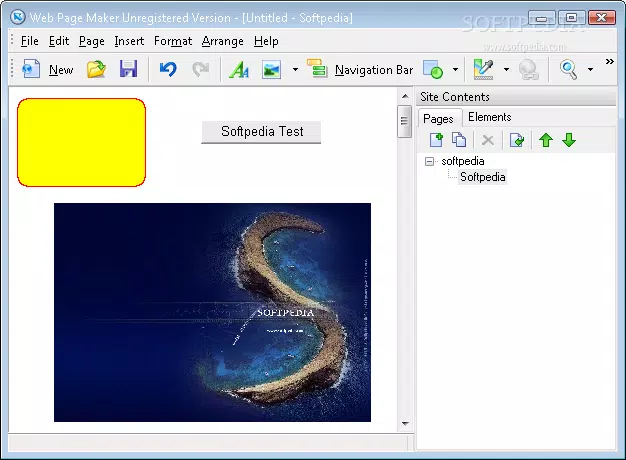
Web Page Maker features a clean, minimalist interface that prioritizes functionality and ease of navigation. The layout organizes tools and elements into clearly labeled panels, allowing users to access design features without confusion. The visual style is modern and uncluttered, minimizing distractions during the design process.
Navigation is straightforward, with intuitive menus and contextual toolbars that appear based on selected elements. Users can switch between design and preview modes seamlessly, enabling real-time evaluation of how the page will appear online. The app supports responsive design principles, allowing users to view and adjust layouts for different screen sizes.
Although the developer did not list formal performance metrics, the application’s lightweight size of 25.3 MB suggests efficient resource usage. It is expected to run smoothly on mid-range Windows systems, though specific performance benchmarks were not disclosed. Stability and responsiveness appear to be well-balanced, with no reported issues in typical usage scenarios.
Compatibility with various Windows configurations is likely, but the developer did not specify minimum OS requirements. Users are advised to ensure their system meets standard Windows application requirements for optimal performance.
Platform Compatibility & Technical Requirements
Web Page Maker is available exclusively for the Windows platform. The current software version is 1.0, with a file size of 25.3 MB. The app is designed to operate on Windows operating systems, though specific version requirements were not listed.
The developer did not specify minimum OS requirements, so users should verify compatibility with their current Windows environment. Given the app’s lightweight footprint, it is expected to function on most modern Windows installations, including Windows 10 and Windows 11.
For users seeking to install the app, the download process is straightforward, and the file size indicates a quick installation. No additional software dependencies were mentioned, suggesting a standalone executable that can be launched immediately after setup.
Pros and Cons
Pros
- Intuitive drag-and-drop interface reduces the learning curve for beginners.
- Pre-designed templates accelerate the website creation process.
- Eliminates the need for HTML or coding knowledge.
- Offers customization options for fonts, colors, and layout.
- Enables rapid publishing with minimal steps.
Cons
- Platform availability is limited to Windows only.
- Specific system requirements were not disclosed.
- No information on cloud sync or collaboration features.
- Customization depth may be limited compared to advanced web design tools.
- Price point of $19.99 may be considered high for casual users.
FAQ
Is Web Page Maker safe to download and install?
Yes, the app is designed for Windows and is distributed through official channels. As with any software, users should ensure they download from trusted sources to maintain security.
Can I use Web Page Maker on macOS or Linux?
Currently, the app is only available for Windows. There is no official support for macOS or Linux platforms.
Does Web Page Maker require an internet connection?
While the app can be used offline for design and editing, an internet connection is required to publish the website to the web.
Are there any updates available for Web Page Maker?
Updates are periodically released to improve functionality and fix issues. Users should check the developer’s website for the latest version.
Can I edit my website after publishing?
Yes, users can return to the app to make changes and re-publish their website. However, the app does not include built-in version history or backup features.
Final Thoughts
Web Page Maker delivers a compelling solution for users seeking to create professional websites without technical expertise. Its combination of a drag-and-drop interface, ready-made templates, and straightforward publishing process makes it a valuable tool for individuals and small organizations aiming to establish a digital footprint quickly.
While its Windows-only availability and lack of detailed system requirements may limit accessibility, the app’s focus on simplicity and speed sets it apart in the productivity category. The $19.99 price point reflects its utility for users who prioritize efficiency and design quality over extensive customization.
For anyone looking to build a functional, visually appealing website in minutes, Web Page Maker offers a practical and secure path to online presence. Download Web Page Maker now.


